In brief
- The changes appear in the October 23 Targeted Release notes.
- Categories are personal labels, not new folders.
- An enabled Send button does not guarantee you chose the right recipient.
Fewer steps for everyday tasks
Microsoft listed several improvements to the new Outlook in its October 23, 2026 Targeted Release notes. One lets you categorize items by dragging them onto a category in Favorites. Another disables Send when a message has no recipients.
These are small adjustments to familiar actions: sorting things to do and drafting a message. The entry belongs to that release channel. It is not confirmation that the changes have reached every account or installation.
A category is not another folder
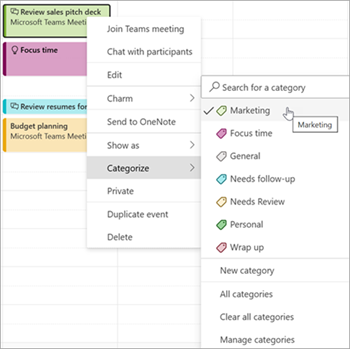
Categories label and group messages. Outlook allows more than one category on the same item, and other people cannot see the categories you assign. That makes them useful for personal organization without changing what the email means to its recipient.
For example, you could separate messages that need a reply from material you only need for reference. Before adding lots of colors, try two or three labels you can recognize at a glance. If dragging onto Favorites does not work in your account yet, the documentation still describes the regular Categorize menu.
Sources and context
Sources used for this article. Follow the links to read the original material.
See the linked sources for more information. Corrections and contact →