A warning before the page opens
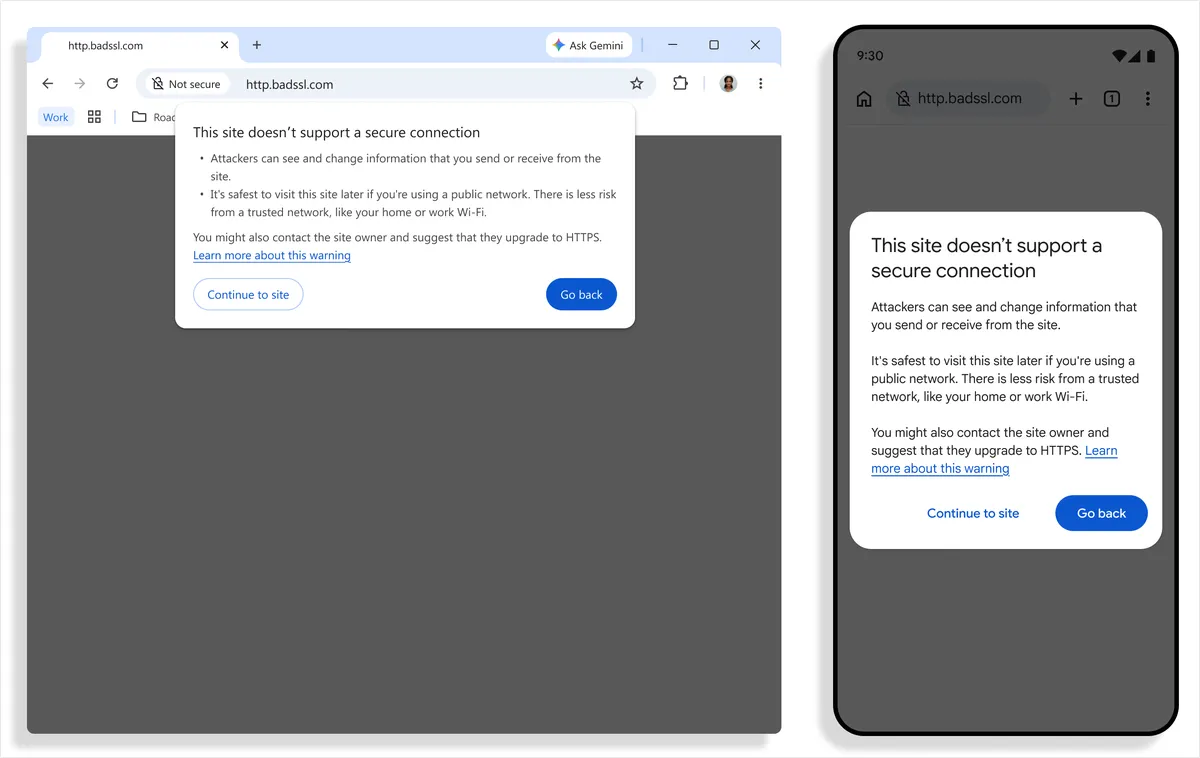
You open a link and see a warning instead of the page. It may look as though something has gone wrong, but Chrome is warning you before connecting to a site that still uses HTTP, an unencrypted connection.
On October 21, Google announced that this protection is now enabled by default for all users. Previously, a “Not secure” label could appear after the connection had been made. Now the warning comes first.
The announcement covers desktop and mobile but does not specify countries or versions. It lists no restriction for Mexico, though that does not confirm the feature is active on every phone or computer in the country.
What to do when you see it
Go back and check the address before entering a password, personal details or payment information. Google’s help pages explain that someone else could see or change what you send and receive over a connection that is not private. Do not dismiss the warning out of habit.
A secure connection does not, by itself, make an online store trustworthy. Even if the site uses HTTPS, check that its name is spelled correctly and that it is the site you meant to visit. Connection security and the seller’s identity are separate issues.
If you need to use the store or service, find its official address another way. You do not need to memorize the acronyms. What matters is pausing before you share information.
Sources and context
Sources used for this article. Follow the links to read the original material.
See the linked sources for more information. Corrections and contact →