In brief
- Kmscon improves virtual consoles; it does not replace your desktop.
- It adds zoom, scrolling and better font handling.
- Administrators should review scripts and legacy tools.
Even the text console needs an update
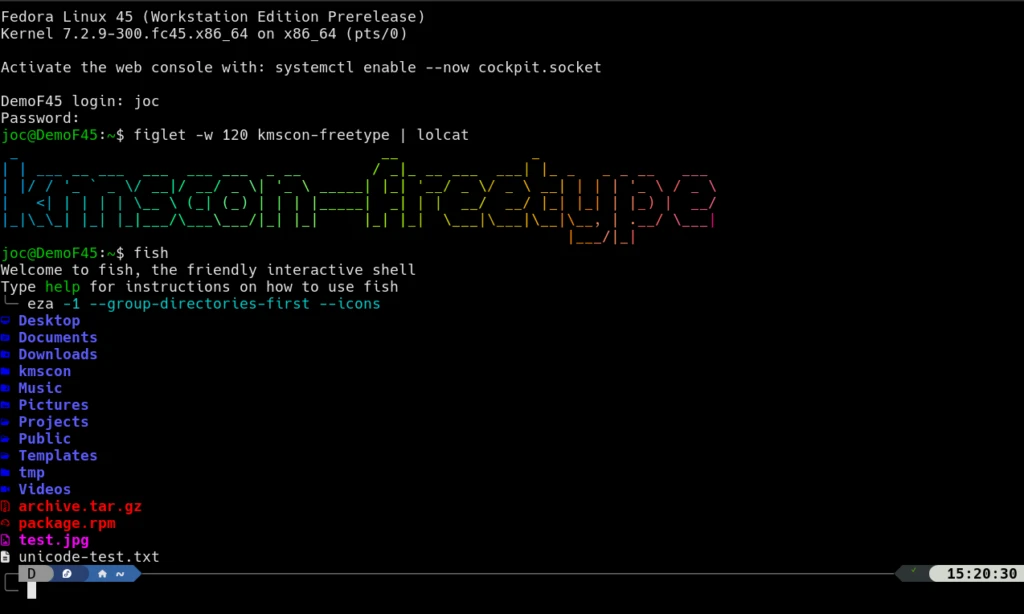
On October 19, Fedora detailed one of the less visible changes in version 45: kmscon replaces fbcon in virtual consoles. These are the text screens that let you log in outside a graphical session, not the Terminal window you open on your desktop.
The change mainly benefits people who manage computers, write code or work directly in these consoles. For everyone else, there is no new desktop to learn. Fedora’s explanation covers this specific component; it is not an announcement that Fedora 45 is generally available.
Easier to use on modern screens
Kmscon lets you resize text, scroll back through previous output and select text with the mouse. It also improves Unicode character support and can use FreeType to render fonts. That matters on high-density monitors, where tiny text can make a simple task awkward.
The architecture is changing too: the emulator moves out of the Linux kernel into a separate program. Fedora’s proposal notes that if kmscon fails, its service can restart rather than cause the sort of kernel crash possible with fbcon. That limits the impact of this kind of failure; it does not make the system invulnerable.
What to check before switching
Compatibility needs checking. Traditional tools such as setfont and loadkeys do not configure kmscon as they did the old console. Scripts that rely on tty device names also need review. Launching a graphical app from this console requires handing over control of the GPU through kmscon-launch-gui.
The proposal keeps fbcon for some parts of the boot process and as a fallback. It does not immediately remove the old console altogether. If you rely on a recovery procedure or an automated workflow, test it before migrating your main computer.
Our take: improving a basic interface counts as progress too. It does not change the list of applications you use, but it can make things easier when you need to work without the desktop.
Sources and context
Sources used for this article. Follow the links to read the original material.
See the linked sources for more information. Corrections and contact →